Change Language
Call Us08045479132

7 Best Microscope Cameras to Buy in 2026

Choosing a microscope camera in 2026 is not just a search for the highest megapixel count. The right camera should suit your microscope, specimens, workflow, and budget. A sensor that captures crisp still images may struggle with fast-moving cells. A high frame rate may matter less when documenting slow changes in a prepared slide.

Physicist Richard Feynman offered a useful reminder about scientific judgment: “The first principle is that you must not fool yourself—and you are the easiest person to fool.” That caution applies when comparing camera specifications. Resolution figures can look impressive, yet pixel size, sensor sensitivity, exposure control, and software compatibility shape the images you actually obtain. Check the camera’s mount and connection, too. A mismatch can add expense or slow installation.

No camera wins every bench. A good choice depends on what you observe.

This guide reviews seven microscope cameras worth considering in 2026, spanning classroom use, routine documentation, and more demanding imaging. We compare practical details, including sensor type, supported frame rates, connection options, and compatibility claims, while noting where specifications deserve closer checking. If fluorescence imaging is your priority, sensitivity and exposure performance may deserve more attention than headline resolution. For teaching, easy setup and dependable live viewing may matter more. These distinctions are easy to overlook. Treat the list as a starting point, not a substitute for checking your microscope model and software requirements.

7 Best Microscope Cameras to Buy in 2026

How Microscope Cameras Capture and Display Images

7 Best Microscope Cameras to Buy in 2026

How Microscope Cameras Capture and Display Images

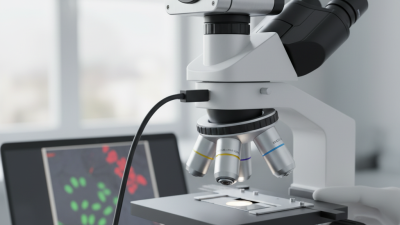
A microscope camera records light passing through the microscope’s optical system. Its sensor converts that light into digital signals, which software assembles into a still image or live video. Many cameras connect to a dedicated microscope port; others use an eyepiece adapter. The connection method affects setup and framing.

Exposure, focus, and illumination all shape the result. If the sample is dim, longer exposure may brighten the image, but movement can create blur. Software can adjust color and contrast, though it cannot restore details the optics never resolved. A screen may show a crisp image, yet its pixels and scaling can make fine structures look different from what you see through the eyepiece. Light matters. I’ve found that a small change in lamp brightness can alter the apparent color of a specimen, so saved images need careful interpretation.

Key Features to Compare Before Buying a Microscope Camera

When comparing microscope cameras, match the sensor to the work you actually do. A larger sensor can capture a wider field, while pixel count alone does not guarantee clearer images. Check the camera’s fit with your microscope’s eyepiece tube or camera port. Adapters can change magnification and framing, sometimes in ways that are easy to miss. Small details matter.

Look for dependable color reproduction, adjustable exposure, and controls that work with your operating system. If you record moving specimens, compare frame rates as well as resolution; a sharp still image is not the same as smooth video. Check the basics. A USB connection may be convenient, but confirm its speed and whether the included software can save images in useful formats. Lighting also affects results, so test the camera under the illumination you expect to use. In practice, a high-resolution sensor can reveal more detail, yet it may produce large files and slower transfers. That trade-off is not always obvious from a specification sheet. Compare warranty terms and sample images carefully, and treat unusually impressive sample photos with a little skepticism.

7 Best Microscope Cameras to Buy in 2026 — Key Features to Compare Before Buying a Microscope Camera

Camera type Typical resolution Sensor and shutter Common connection Main strengths Best suited for Key trade-off
1. Entry-level USB camera About 2–5 MP Small CMOS sensor; usually rolling shutter USB 2.0 or USB 3.x Low-cost way to capture still images and live views; straightforward computer connection Basic classroom demonstrations, routine viewing, and introductory microscopy Small sensors and lower data throughput may limit low-light image quality and live-view performance
2. General-purpose USB 3 camera About 5–8 MP CMOS sensor; commonly rolling shutter USB 3.x Good balance of detail, live-view responsiveness, and computer-based capture Teaching labs, documentation, and everyday brightfield imaging Frame rate depends on resolution, exposure time, computer, and software
3. High-resolution documentation camera About 10–20 MP Larger-format CMOS sensor; commonly rolling shutter USB 3.x Captures fine detail and provides room for cropping or printing larger images Specimen records, inspection, and images where spatial detail matters more than motion Large images require more storage and processing; live video may be slower at full resolution
4. Large-pixel, low-light camera About 2–8 MP CMOS sensor with relatively large pixels; often rolling shutter USB 3.x Designed to collect more light per pixel than many small-pixel sensors of similar generation Dim samples, fluorescence observation, and longer-exposure imaging Lower pixel count may capture less fine spatial detail than a higher-resolution alternative
5. Cooled scientific camera Often about 6–20 MP Cooled CMOS sensor; shutter type varies by model USB 3.x; some systems use other high-speed data links Sensor cooling can reduce thermal noise during long exposures; may offer scientific capture controls Low-light fluorescence and repeatable research imaging with long exposures Typically costs more and may need additional power, cooling, or specialized software
6. High-speed global-shutter camera About 1–5 MP CMOS global shutter, exposing pixels simultaneously Usually USB 3.x or another high-bandwidth interface Reduces rolling-shutter distortion when imaging moving specimens or during rapid motion Fast processes, moving samples, and time-sensitive measurements High frame rates depend on exposure, resolution, interface bandwidth, and host-computer performance
7. Standalone HDMI microscope camera Commonly about 5–8 MP CMOS sensor; shutter type varies by model HDMI display output; recording options vary Can show a live image on a monitor without using a computer for viewing Shared viewing, demonstrations, and simple inspection setups Image control, file formats, and analysis features may be more limited than computer-connected systems

How to compare: These are camera categories and indicative specification ranges, not guaranteed specifications for individual products. Check the exact camera’s sensor size, pixel size, shutter type, supported frame rates, microscope mount, software compatibility, and recording options before buying.

Seven Microscope Cameras to Consider in 2026

Seven microscope camera types deserve consideration in 2026, but the right choice depends on the specimen and workflow. Allied Market Research valued the digital microscope market at $1.2 billion in 2021 and projected $2.4 billion by 2031. That forecast signals growing interest, not a guarantee of better images. Market size cannot tell you whether a sensor will capture the faint detail you need.

An eyepiece camera is compact for classroom demonstrations. A USB CMOS camera suits live viewing on a computer. HDMI cameras send images directly to a monitor, while Wi-Fi models simplify sharing at a workbench. Cooled scientific cameras can reduce image noise during dim fluorescence imaging. High-speed cameras help record fast motion, and DSLR-style cameras can work for still images when a suitable optical adapter is available. Seven options, seven trade-offs. Check sensor size, pixel dimensions, frame rate, and software compatibility before buying.

More megapixels do not automatically reveal more detail; microscope optics and sensor sampling both matter. A tiny sensor may crop the field of view, which can surprise first-time buyers. I would still test the camera with the actual microscope and sample, if possible. Also inspect how files export: awkward software can slow routine documentation, even when the image looks sharp on screen.

7 Microscope Camera Resolutions to Consider in 2026

Compare common image formats by their approximate megapixel count.

Megapixels are calculated from each format’s pixel dimensions. Higher resolution can capture more detail, but image quality also depends on sensor performance, optics, lighting, and the intended use.

Comparing Image Quality, Software, and Connectivity

When comparing the seven best microscope cameras to buy in 2026, look beyond headline resolution. A high pixel count cannot rescue soft optics or poor color handling. Check whether fine details remain clear at the edges of the field, not only in the center. In a prepared slide, subtle cell boundaries and faint stains are useful tests. Dynamic range matters too: bright regions should not wash out while darker structures disappear. Check the shadows.

Software can shape daily use as much as the sensor does. Look for reliable live previews, simple exposure controls, and measurement tools that preserve scale after image export. Confirm that files open in common analysis programs. Some interfaces feel polished but hide basic settings; that can slow a careful comparison. I would test the workflow before buying, because specifications rarely show how awkward a menu feels during a long session.

Tips: Verify your microscope’s camera mount and computer compatibility first. Compare USB and wireless options in your actual workspace; wireless access is convenient, but lag can make focusing frustrating. Ask whether the camera needs a separate power source. Save a sample image and inspect it at full size. A slightly imperfect color match is not always a deal-breaker, but consistent exposure and dependable connections are.

Matching a Microscope Camera to Your Equipment and Needs

A microscope camera should fit the instrument you already own, not just look impressive on a specification sheet. Check the camera port, thread type, and required adapter before comparing image quality. A camera may use a common mount yet still sit too far from the optical path. That can cause vignetting, with dark corners around the image. Small details matter.

Sensor size affects how much of the microscope’s view appears on screen. A large sensor is not automatically better; it must match the microscope optics and adapter. For routine slides, clear color and reliable software may matter more than extreme resolution. If you document tiny structures, compare pixel size and resolution at the magnification you actually use. A test image helps. So does checking whether the camera’s software runs on your computer.

Think about how you work at the bench. Live demonstrations benefit from a smooth frame rate, while still-image documentation may need stronger resolution and exposure controls. Confirm that the camera supports your operating system and preferred file formats. I have learned the hard way that a crisp image is less useful when capture software is awkward. Leave room for a learning curve; setup can take longer than expected.

Back to top