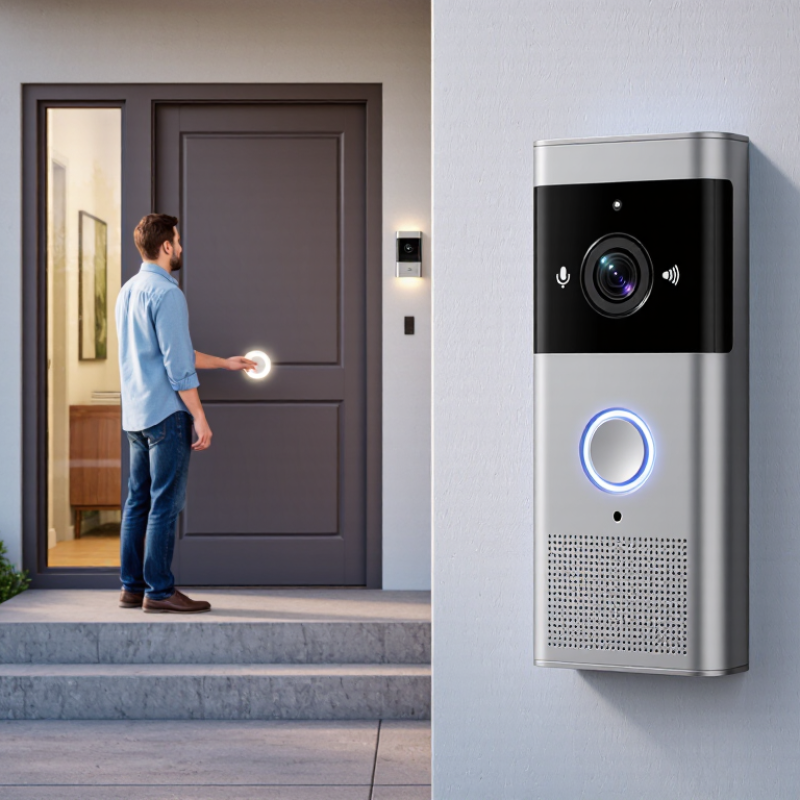
| Definition | A video doorbell is a connected doorbell with a camera, microphone, speaker, and motion-sensing functions. | It can show who is at the door and support two-way communication. | It supplements, rather than automatically replaces, a traditional doorbell or home security system. |
| Doorbell Activation | Pressing the doorbell button sends an event notification to the connected system. | The event may trigger a chime, smartphone alert, live video, or recording. | The response depends on the device settings, internet connection, and account configuration. |
| Camera Function | The camera captures a live view of the area in front of the entrance. | Common features include wide-angle viewing, automatic exposure, and image capture. | Actual visibility can be affected by mounting height, viewing angle, lighting, and obstructions. |
| Video Resolution | The camera converts visual details into a digital video stream. | Common consumer resolutions range from approximately 720p to 2K, depending on the model. | Higher resolution can improve detail but may require more storage, bandwidth, and processing power. |
| Night Vision | Infrared light or low-light image processing helps the camera record when visible light is limited. | Night footage is often displayed in grayscale when infrared illumination is active. | Bright lights, reflective surfaces, rain, and darkness beyond the camera’s range may reduce image quality. |
| Motion Detection | Sensors and software identify movement within selected areas and can create alerts. | Detection zones, sensitivity controls, and event schedules are commonly available. | Vehicles, animals, shadows, weather, and passing pedestrians can cause unwanted notifications. |
| Audio Communication | A built-in microphone receives sound while a speaker transmits the user’s voice. | Two-way talk allows a resident to communicate with a visitor through an app. | Audio clarity depends on wind, traffic, distance, network delay, and background noise. |
| Internet Connection | The doorbell usually connects through a home wireless network and exchanges data with an app or online service. | Remote viewing and alerts generally require a functioning internet connection. | A weak connection can cause delayed notifications, interrupted video, or unavailable remote access. |
| Power Source | Devices may receive power from existing doorbell wiring or from a rechargeable battery. | Wired units can operate continuously; battery units require periodic charging. | Battery life varies with temperature, motion frequency, video quality, and live-view usage. |
| Video Storage | Recorded clips may be saved locally, on removable storage, or on a remote online service. | Storage duration depends on recording length, resolution, available capacity, and retention settings. | Online storage may require an account or paid plan, while local storage requires compatible hardware and management. |
| Mobile Notifications | The system sends an alert when a configured event occurs. | Notifications may include a timestamp, event type, thumbnail, or direct access to live video. | Phone permissions, app settings, mobile data, and internet availability affect delivery. |
| Smart Detection | Software may analyze video to distinguish categories of movement. | Possible categories include people, packages, animals, or general motion, depending on the device. | Automated classifications are not guaranteed to be accurate in every lighting or weather condition. |
| Installation | The unit is mounted near the entrance and aligned to cover the desired approach area. | Installation may involve screws, a mounting bracket, wiring, and network configuration. | Electrical work should follow local regulations and may require a qualified professional. |
| Weather Resistance | Outdoor-rated housings protect internal components from specified environmental exposure. | Weather protection is commonly described by an ingress-protection rating or manufacturer specifications. | The rating does not mean the device is immune to extreme heat, freezing temperatures, flooding, or physical damage. |
| Privacy and Security | Video and audio can be protected through account controls, encryption, access permissions, and privacy settings. | Useful controls may include activity zones, audio disablement, user management, and data-retention options. | Users should position the camera responsibly, use strong passwords, enable multi-factor authentication when available, and follow local privacy laws. |



 08045479132
 Send Inquiry

 Send Inquiry
 Send SMS