What Is an Intel 12th Gen Industrial Computer?
An Intel 12th Gen Industrial Computer uses Intel’s 12th-generation Core processors, known as Alder Lake, in a system designed for demanding industrial environments. These processors combine Performance-cores with Efficiency-cores, helping balance responsive computing with background workloads. Intel CEO Pat Gelsinger described Alder Lake as a “major architectural shift.” For industrial buyers, that shift matters only when the complete computer is engineered to use it well.
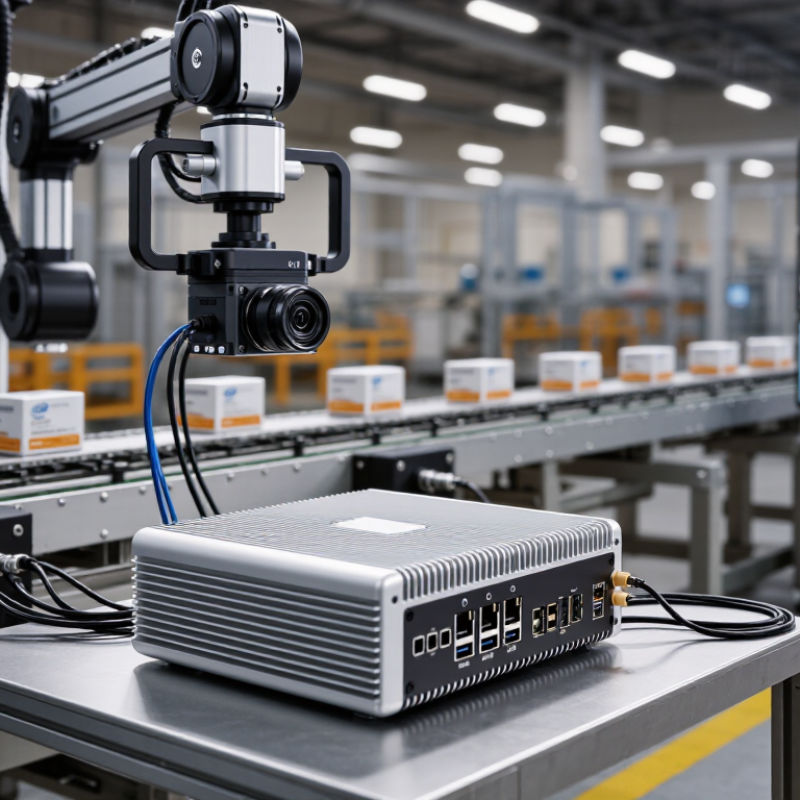
Picture a production line where a machine-vision camera checks labels while a control application records sensor readings. A carefully configured Intel 12th Gen Industrial Computer can assign demanding tasks to Performance-cores and lighter work to Efficiency-cores. That can improve workload handling. But it is not automatic. Cooling, firmware, memory, expansion slots, and operating-system support all affect real-world results. A powerful processor inside a poorly ventilated enclosure may throttle under sustained load. This detail is easy to overlook.
Industrial models may offer features such as multiple display outputs, serial ports, wide-temperature components, and fanless enclosures. Availability varies by manufacturer and configuration, so check the specifications rather than relying on the processor name alone. Ask about workload benchmarks, operating temperature, lifecycle support, and compatibility with existing software. A brief test with your actual cameras, sensors, and applications can reveal problems that a datasheet cannot. And some uncertainty remains: industrial conditions differ, and no single configuration suits every factory. This guide explains what the platform offers, where it fits, and what to verify before choosing one.
What Defines an Intel 12th Gen Industrial Computer?
An Intel 12th Gen industrial computer is a rugged system built around a 12th-generation processor platform. Its defining feature is not the processor alone. The computer must also handle sustained workloads, varied temperatures, vibration, and the interfaces used by industrial equipment. In practice, enclosure design and cooling matter as much as peak speed.
This processor generation uses a hybrid architecture, combining performance cores with efficiency cores. That can help a system run control software, data collection, and user interfaces at the same time. But results depend on software scheduling and the specific processor chosen. More cores do not automatically mean faster machine control. Check memory capacity, storage type, and operating-system compatibility against the actual workload.
Look closely at the connections. A factory installation may need serial ports, multiple Ethernet connections, digital I/O, or display outputs. Fanless models can reduce moving parts, though they still need a clear path for heat to escape. Dust buildup around vents can cause trouble. Pay attention to rated temperature ranges, mounting options, and power input requirements before deployment. Specifications vary between models, and a feature list alone can be misleading. Test the computer with the intended devices and software under realistic conditions; that step is easy to overlook.
How the 12th Gen Intel Core Architecture Works
A 12th-generation industrial computer uses a hybrid processor design, combining performance cores with efficiency cores. Performance cores handle time-sensitive tasks, such as responding to a camera trigger or running machine-vision software. Efficiency cores can take on background services and parallel workloads. A scheduler uses workload information to assign threads, though actual behavior depends on the operating system and application. The result is not automatically faster in every task.
This architecture can suit edge systems, where computing happens near sensors and machines. Gartner forecast in 2018 that 75% of enterprise-generated data would be created and processed outside traditional data centers or cloud environments by 2025. That forecast highlights the value of local processing, but it is not a measurement of every industrial site. In practice, performance also depends on cooling, memory, storage, and I/O. A compact fanless enclosure may throttle under sustained load, even when short tests look impressive.
Tip: Check sustained thermal performance, memory support, and required expansion slots. Test the real workload; peak core counts alone can mislead.
Which Industrial Features Support Reliable Operation?
An industrial computer built around a 12th-generation processor brings modern computing performance to factory floors, machine rooms, and vehicle systems. But processor speed alone does not make a computer industrial. The enclosure, cooling design, power handling, and connections matter just as much.
Dust and vibration are everyday concerns. A fanless metal chassis can reduce moving parts and help shed heat, though it still needs clear airflow around its fins. Inside a control cabinet, blocked vents can turn a good design into an unreliable one. Small detail, big consequence.
Industrial models may offer wide-range DC power inputs, surge protection, and watchdog timers that restart a stalled system. Multiple Ethernet ports, serial connections, and digital inputs can link the computer to sensors, drives, and older equipment. That saves adapters. Sometimes.
Temperature ratings and vibration tests are useful, but they do not guarantee trouble-free operation in every installation. Check the actual operating range, mounting method, and connector retention for the intended site. I/O needs can change, too, so leave room for expansion where possible. A compact system may fit neatly on a machine, yet offer little space for later changes. That trade-off deserves a second look.
What Is a 12th-Generation Industrial Computer?
An industrial computer built around a 12th-generation desktop-class processor combines hybrid computing cores with industrial-grade components. Reliable operation depends on the complete system design, not the processor alone.
How to read the chart: These are maximum architecture-level counts for desktop-class configurations; exact resources vary by processor model. For dependable industrial operation, check the computer’s rated operating temperature, power-input protection, cooling design, vibration resistance, and long-term component availability.
Where Are These Computers Commonly Used?
What Is a 12th Gen Industrial Computer?
Where Are These Computers Commonly Used?
A 12th-generation industrial computer uses a recent multi-core processor platform for demanding control, monitoring, and data tasks. Rugged models may include fanless cooling, wide-temperature components, and isolated ports. Their real value depends on the enclosure, power supply, and software—not processor speed alone.
These computers commonly serve factory floors, warehouses, energy sites, and transport systems. On a production line, one unit may read camera feeds, track sensor signals, and coordinate machine controls. Warehouses use them to manage conveyors and scan stations. At energy and water facilities, computers can monitor pumps, meters, and alarms in dusty control rooms. The International Federation of Robotics’ World Robotics 2024 report counted 4,281,585 industrial robots operating worldwide at the end of 2023. That scale helps explain demand for dependable computing near automated equipment. But more processing power is not automatically better; heat, vibration, and maintenance access still matter.
Tips: Check the operating-temperature range and port isolation before choosing a system. Test it with your actual software and peripherals. A paper specification can miss awkward details—like a cable that blocks a service panel.



 08045479132

 Send Inquiry


 Send Inquiry
 Send SMS